

Appearance
Playing the game
Nowhere in Particular is a calm exploration game set in a real place: 6 × 6 km of Głowno, Poland, built from open data (OpenStreetMap, GUGiK's 1 m elevation) with its real streets, fields, forests, reservoirs and bridges. The sun, the moon, the seasons and the real weather are Głowno's. A small proving ground (--proving-ground) is there for testing the driving.
The game is a Godot 4.7 project that runs on gasm: the engine is one WebAssembly file, godot.wasm, and the game is a Godot package, nowhereinparticular.pck, that the engine loads as an asset. The same two files run in the browser and natively.
Your privacy
No account, no registration, no login: not now, not ever. No analytics, no tracking, no ads. What you do in the game stays on your computer: your settings, your pictures, your walks and rides, your achievements. The full story is in the privacy policy (po polsku).
The game goes on the network only for these, and only when they happen:
- The real weather: when you sync with the real world (K), and then every 5 minutes if you keep it up to date (Settings). It asks MET Norway for the forecast at the town's coordinates, Głowno's, not yours.
- The land, in the browser: as you drive, the browser player downloads the part of the map around you from this site. The downloaded game has the map inside it.
- Support, when you use it: a report goes out when you send one, with exactly what's listed under Support, and while one is open the phone checks for answers once a minute. A game that never sent a report never talks to the support desk.
- Postcards, if you turn it on: your chosen name, your friends, and messages until they're delivered; in a roam, where you are and how you and your vehicle look, to the other players.
- Mixtape, when you play a live station: the game connects straight to that radio station. Nowhere FM, the game's own, plays from the game and connects to nothing.
- Use my phone (on unless you turn it off): the game announces itself on your own Wi-Fi (Bonjour) and talks to the phone app you allow, directly, never through the internet or us (your game's pictures too, when you open the Gallery there). The phone looks for the game on its local network only.
To the support desk you are an id the game makes up (random, apart from the time it was made: the phone's Me app shows it) and a secret the desk makes for it the first time you use Support. It keeps the id, a hash of the secret and your reports: no name, no e-mail. Reports go a year after they're closed, everything two years after your game last spoke to it. Phone › Me › Your data on the server saves a copy of all of it, or deletes it there for good.
Want no network at all? Settings › General › Online: off, and the game never goes online. Everything else works as before, without errors.
This site is plain pages (on GitHub Pages) with no cookies, analytics or trackers. The browser player keeps what it downloaded (the engine, the game, the land) in your browser's storage, so the next visit starts quickly: Clear downloads under the game forgets it, and Delete my saves deletes what the game saved there.
Play it
The game opens on the Earth as it is right now (day where the sun is up, the cities' lights where it's night), to a little jazz guitar, with the places you can drive marked on it: drag to turn the globe, scroll to zoom. The places are listed down the left: ↑ ↓ (or the wheel over the list) roll through them and turn the globe to each, a click on a mark picks it in the list, and Enter (or a second click) flies in. Then its title comes up over the hills while the land around you loads, and fades into the drive (a key or a click lets it go as soon as the land is in). To go somewhere else later: Esc, Choose another place…. To leave the game: Exit the game (bottom right), or Esc twice (the downloaded game; in the browser, close the tab).
In your browser
Open the player and press Play. The first start downloads the engine (32 MB) and the game (about 3 MB); the land comes as you drive, a square kilometre at a time (about 0.6 MB each), so you're on the road within seconds. The browser keeps what it downloaded (the engine, the game and every place you've driven through): the next visit downloads only what changed since, often nothing at all. Clear downloads under the game forgets it. You need a browser with WebGL 2 (a recent Chrome, Edge, Firefox or Safari) and a keyboard or a gamepad. Click the game so it has the keyboard; press Fullscreen to fill the screen.
K (sync with the real world) fetches the real weather from MET Norway. If that fails, the clock still syncs.
The command-line options work in the browser too, as ?args=: for example /play/?args=--weather=snow --time=2026-01-15T12:00.
Downloads
The free demo (Głowno) is also a download for macOS, Linux and Windows, with the map editor and mod tools and your own roam server beside it: all on the downloads page, each release with its checksums. On a Mac, unzip it and double-click Nowhere in Particular.app (it isn't signed yet: right-click › Open the first time); on Linux and Windows, unpack it and run play.sh or play.cmd. The full game, with more of the world, is coming to itch.io and Steam; follow emdzej.pl for news.
Controls
For the first ten seconds the top-left corner says how to see the controls: ? (the / key) shows them all, for what you're doing (driving or on foot), as you've set them.
The quick menu
What you can do where you are is on a wheel of eight directions, two levels deep: a category in each direction, and in each category its things in their own directions, so up and then down-right is always the hazard lights, and soon a flick you don't need to look at. What can't be done right now is greyed in its place and says why ("No parking brake on a boat"); a choice of several (the lights, 2H / 4H / 4L) opens a small ring of its own. Each category keeps its direction whatever you're doing: Vehicle up, Drive up-right, Load & carry right, Get in / out down, Companion down-left, Phone left, Me up-left (the flashlight, the backpack on or off, sitting down); Camp down-right (on foot: set up a camp, clear it). Phone isn't a ring: point left and the phone comes out (its apps are on the phone). Each mode has only its own: on foot there's no Vehicle, on a kayak no Drive. Playing alone, time slows to a third while it's open (not when roaming with friends), and the world blurs and dims a little behind it.
| Action | Keyboard and mouse | Gamepad |
|---|---|---|
| Open it | Enter (again with nothing aimed at: close it) | Hold View / Back |
| Aim (a category opens as you aim at it on the keyboard) | ↑ ↓ ← → and two together for a diagonal, or the numpad's 1-9; the mouse's direction | Right stick: held on a category (or pushed all the way) it opens |
| Do it | Enter, or a second direction pressed quickly after the first; a click | Let go of View (with the stick centred: nothing) |
| Back a level | Esc or Backspace; the right mouse button | B |
| The last thing again | A tap of View |
On a gamepad the left stick and the triggers keep driving while it's open; on the keyboard the car rolls on with its keys let go.
Camping
On foot, the quick menu's Camp › Set up camp brings out a tent and a campfire to place: they stand see-through in front of you, green where they fit and red where they don't, with the reason underneath (too steep, on the road, too near the water, a building or trees in the way). Walk and turn and they come along; turn them round their fire with the keys below; set them up where they're green. On a red spot the game says where nearby they would fit. The fire burns day and night (dimmer in the rain, out in a downpour), with its glow, smoke drifting with the wind and a crackle when you're near. There's one camp at a time: setting up again somewhere else moves it, and Clear camp packs it away when you're near it. It stays where you left it, for the next time you play, and shows as a small tent on the minimap and the map. Roaming with friends, they see your camp and you see theirs.
Camping together: a camp is one fire and the tents round it. Roaming with friends, set up camp near a friend's fire (within 10 m; no second fire can go up that close) and only your tent comes out, standing round their fire with its door towards it: walk to move it round the fire, turn it with the same keys, and it keeps clear of the other tents. Everyone sees the one fire and every tent; look at a tent to see whose it is. Clear camp packs away only your tent: the fire burns on while any tent is there, and goes with the last. When you play alone again your own camp is as you left it (your tent, and the fire if you lit it).
| While placing the camp | Keyboard and mouse | Gamepad |
|---|---|---|
| Set it up here | Enter or a click | A |
| Turn it (a press a little, held round) | Q / E, the mouse wheel | LB / RB |
| Move it | Walk: W A S D | Left stick |
| Leave it | Esc | B |
Driving
| Action | Keyboard | Gamepad |
|---|---|---|
| Throttle | W or ↑ | Right trigger (RT) |
| Brake (and in the easy gearbox, reverse: hold it at a standstill) | S or ↓ | Left trigger (LT) |
| Gear up / down (or the selector: P R N D) | Shift / Ctrl | B / D-pad down |
| Steer | A / D or ← / → | Left stick |
| Handbrake: hold it to brake the rear wheels (for a slide), tap it to pull the parking brake on, tap again to let it off. On two wheels: a wheelie (hold), on the bicycle a hop (tap) | Space | A |
| Parking brake on / off (the same as a tap of the handbrake) | P | A tapped |
| Blinkers left / right: again (or straightening up after the turn) to cancel; with Indicators: Automatic (the phone's Garage › Driving, on by itself the first time you use a gamepad) they come on by themselves when you turn off slowly, below 30 km/h | Q / E | Left / right stick click |
| Hazard lights | End | Quick menu: Vehicle, down-right |
| Horn (hold); a bicycle's bell | H | Quick menu: Vehicle, down-left |
| The quick menu (above) | Enter | Hold View / Back |
| Use: get out and walk (on foot it does what's by you: Walking) | F | D-pad left; quick menu: Get in / out, down |
| Reset the vehicle (upright, where it is) | R | Quick menu: Get in / out, left; or Start, Reset the vehicle |
| Change vehicle | Quick menu: Get in / out, up; or the phone's Garage | The same; or Start, Garage… |
| Lights: automatic, on, parking lights, off | L | X |
| High beams on and off (with the lights on) | J | Quick menu: Vehicle, Lights, Main beam |
| Flash the headlights (while held) | U | |
| Engine off and on | I | Quick menu: Vehicle, up |
| Speed limiter | X | D-pad up |
| Cruise control: holds the speed you're doing (from 30 km/h); again, or the brake, to switch it off; the throttle still overtakes | Z | Quick menu: Vehicle, left |
| Fog lights: front, then front and rear, then off | G | Quick menu: Vehicle, right |
| Pause: the screen, picture, sound, keys, gearbox | Esc | Start |
Above the dial's centre, the odometer and the trip meter: yours, not the car's, counting every car and motorbike you drive (a jump on the map adds nothing). Reset the trip from the quick menu (Enter, Vehicle, up-left) or the phone's Garage (its Trip tab, with the odometer). Beside the speedometer, the cluster's lights: the blinkers (green arrows), the headlights (green, an A when they're automatic; two small lamps for the parking lights), the high beams (blue), the front and rear fog lights (green, amber), the parking brake (a red (P)), traction control (amber, flashing while it holds a spinning wheel back), cruise control (green; a green notch on the dial marks its speed) and the hazard lights (red).
Every key can be changed in the settings (Esc, Keys).
Walking
On foot, F (a gamepad's D-pad left) does what's by you, and a small prompt under you says what before you press it: F Get in by the car's door, F Hitch the trailer at a trailer's coupling, F Launch the jet ski beside it, F Take the bicycle down by its rack, F Sit by the fire at your camp. When it can't be done yet the prompt is grey and says why ("Take the jet ski off first"). After you use a gamepad it names the pad's button.
| Action | Keyboard | Gamepad |
|---|---|---|
| Use what's by you, as the prompt under you says: get in at the car's door, hitch or unhitch the trailer at its coupling, launch or load the jet ski at the trailer, take a bike down off its rack or put it back, sit by your campfire (and stand up). With nothing by you, back in the vehicle (from afar: twice, to bring it to you) | F | D-pad left; quick menu: Get in / out, down (and right: bring it here) |
| On foot by the car: take a carried bike down, or put it back up | Y | Quick menu: Load & carry, up |
| Walk forward, step back | W / S or ↑ / ↓ | Left stick |
| Turn | A / D or ← / → | Left stick |
| Pace: stroll, walk, jog, run, sprint | Shift / Ctrl | B / D-pad down |
| The next pace, round again from a sprint to a stroll (one button for all five) | T | Left stick click; quick menu: Me, up-right, to pick one |
| Jump | Space | A |
| Flashlight on and off | L | X |
| The phone: camera, gallery, map, fitness, Postcards (roams with friends) | N | Quick menu: Phone (left: it comes out at once) |
| Screenshot (to your Pictures and the phone's gallery) | F12; Shift+F12 without the HUD | |
| Fullscreen, or back to the window (the downloaded game; in the browser, the page's button) | F11; on a Mac also Ctrl+Cmd+F | |
| Sit down: with a low wall, the side of the stairs or a step behind you, you turn your back to it and sit on it, feet on the ground; else cross-legged on the ground (by a drop ahead, a jetty's or a bank's edge, your legs hang over it). Again, or a step, to stand up | B | Quick menu: Me, down |
| Stand up where you are | R | Quick menu: Get in / out, left |
| Your cat or dog along, swapped, sent home | Quick menu: Companion | The same |
More in On foot.
Camera
| Action | Keyboard and mouse | Gamepad |
|---|---|---|
| Switch camera (chase / first person / top-down) | C | Y |
| Orbit the camera | Move the mouse (while the pointer is in the window), or , / . | Right stick |
| Zoom | Mouse wheel, or + / − | LB / RB |
The chase camera sits low and close behind the car, the road ahead over its roof, and swings back behind it a couple of seconds after you stop orbiting. The first person puts you behind your own eyes: walking, from the driver's seat, or on the saddle; the mouse turns your head, and it comes back to the road ahead a moment after you stop looking round. The top-down view looks at the car from above, north up, like a map that follows you.
Inside the car, nothing on the screen. In the first person in a car or on a motorcycle the speedometer, the minimap, the weather and the strip of lights leave the screen: they're in front of you, where they would be. The wheel in front of you turns as you steer, the blinker's stalk and the selector move with them, and you can look round the cabin. Behind the wheel, set into the dash, one wide cluster: on the left the dial and the lights (and in the off-roaders their gauges), in the middle the speed in big digits, the gear, the time and the outside temperature, on the right the minimap with your heading and the street, the weather, the trip meter and what Mixtape is playing. Beside its right end, your phone in its mount, showing the time; whatever the game tells you comes in there as a notification, with a soft chime. On the dirt bike a smaller cluster and the phone sit on the bars, and the map and the weather are on the phone. The screens are dimmer at night. N opens the phone where it is, on its mount: you glance down at it, its screen fills the view, and you use it as in your hand (the keys, the mouse on its screen, a gamepad); put it away and you look back at the road. As anywhere in a vehicle, it opens only when you've stopped, and driving off puts it away. Its camera has the whole view, as always; the quick menu, the map and the Paused panel open over the view too. On a bicycle, in a boat and under a wing the first person keeps the screen's instruments, and the phone comes into your hand.
Time, weather and the map
| Action | Keyboard | Gamepad |
|---|---|---|
| Map | M | D-pad right |
| One hour back / forward | [ / ] | |
| Sync with the real world | K | |
| Mixtape: play or pause, the station before, the next one (as a steering wheel's buttons, without the phone) | O, 9, 0, or the keyboard's media keys |
In the map: drag (or hold the arrow keys or WASD, with Shift faster) to pan, the mouse wheel zooms (towards the pointer; - and = too), F follows the car again, double-click a spot (or point at it and press G) to drive from there, M closes it. Choose another place… at its top (or O) goes back to the globe, once you've said yes.
The screen
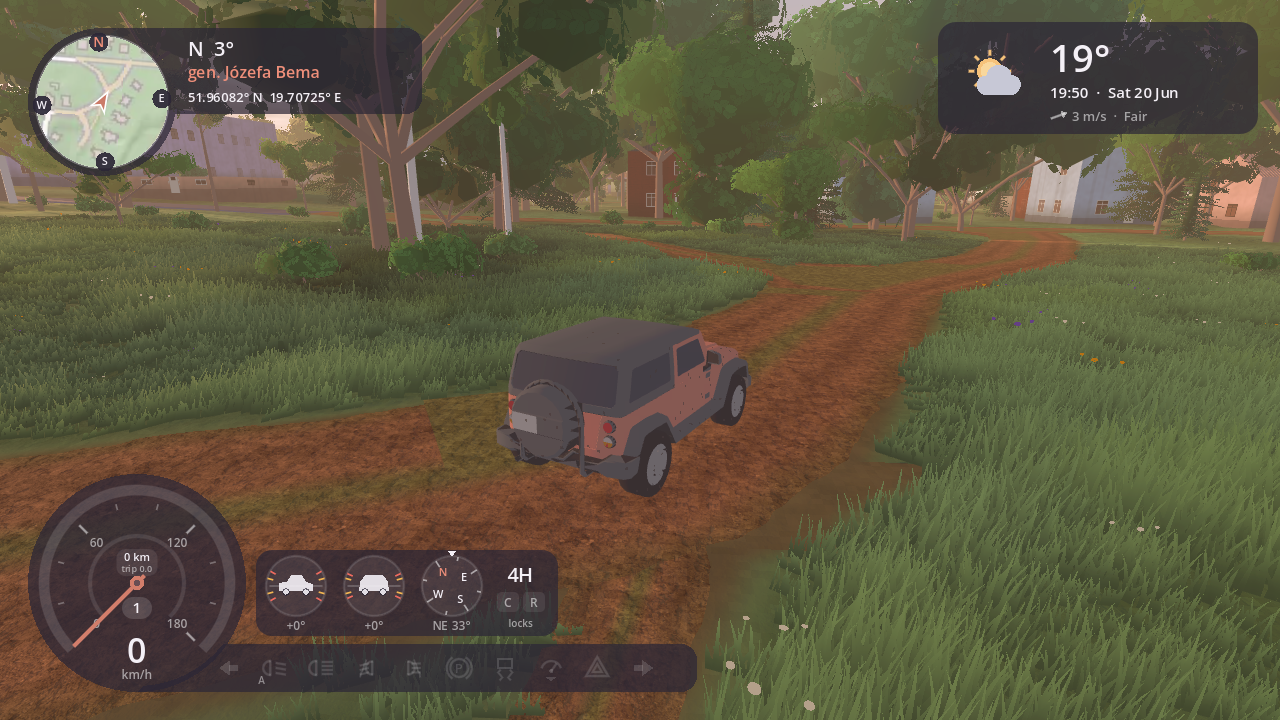
- Bottom left, the speedometer: a dark dial with the speed (km/h) and needle, the gear (1-6, D3 in the automatic, M3 when you choose the gears, P, N, and R in coral when reversing) and a thin arc for the engine's revs that warms towards the redline. A coral notch marks the speed limiter's limit, a green one the cruise control's speed. Beside it, a strip of the car's lights (above). On foot it becomes a sports watch (On foot).
- In the off-road vehicles (the Explorer, the pickup, the dirt bike), above the strip of lights: an inclinometer, and in the Explorer and the pickup the drive (2H, 4H, 4L) and the diff locks (C for the centre, R for the rear, lit when locked), all changed from the quick menu's Drive (Enter, up-right): 2H drives the rear wheels, 4H all four, 4L all four slowly and strongly (up to 40 km/h, changed standing still); a locked diff turns its wheels together, for mud, sand and a wheel in the air. Also the vehicle's pitch (seen from the side) and roll (seen from behind) in degrees, amber from 15° and red as it gets close to tipping (30° nose up or down, 25° on its side), and a small compass with your heading.
- Top right, the weather (on a dark card, like the rest): an icon for the conditions (sun or moon by the real sky, clouds, rain, snow, fog, storm), the temperature, the time and date, and the wind (an arrow showing where it blows, north up).
- Top left, the minimap: a round map, with the roads and the buildings, that turns with the camera (where you look is up), the compass on its dark rim, and on a strip beside it your heading, the street you're on, and latitude and longitude. On foot you're the blue dot in the middle (its tick is where you face) and the car's arrow is where you left it, waiting on the rim when it's further away than the map shows.
- Debug info (off unless you switch it on in the settings): bottom right, the map tile and the game position, handy for reporting a spot that looks wrong.
F12 saves a screenshot, the screen as it is with the dashboard, to your Pictures and the phone's gallery (with where and when it was taken, as the phone's photos are); the phone tells you it's saved. Shift+F12 takes the same picture without the HUD, the phone or any panel: only the world. In the browser, F2 (or Copy screenshot under the game) copies the current frame to the clipboard instead, ready to paste anywhere.
The map (M) opens over the game and pauses it; Esc closes it. The time and the weather are set on the phone (Time & Weather).
Pause and settings
Esc (a gamepad's Start) pauses the game and opens the Paused panel over it, the game blurred behind. Its tabs: Screen (switch each part of the HUD on or off), then the settings: General, Picture, Sound, Keys, Mods (the vehicles, the gearbox and the indicators are the phone's Garage; the real weather's refresh is in Time & Weather). It opens on the tab you left it on, and every change applies at once and is kept. Under the tabs: Resume, Reset the vehicle, Garage… (the phone's, to change vehicle: the gamepad's way there), Choose another place…, Back to the defaults (on the settings' tabs) and Exit the game. The panel works from the keyboard and the gamepad too: ↑ ↓ ← → or Tab move between the controls (the one you're on has a coral outline), Enter or Space presses or opens it, ← → move a slider, Q / E (or Page Up / Page Down, Ctrl+Tab, a gamepad's shoulder buttons) change the tab, Esc (Start) closes.
- Picture: the resolution: Auto (picked for the window, and again when you resize it or go fullscreen: full up to about 2560×1440 pixels, less beyond, at most 75 % in the browser), or one of the usual ones for your screen's shape up to its own (1280×720 HD, 1920×1080 Full HD, 2560×1440, 3840×2160 4K... on a 16:9 screen): the world is drawn at it and scaled up to fill the window or the screen, which itself stays at its own resolution (menus and text sharp). Fewer pixels are the biggest speed-up on high-density screens such as Retina. In the downloaded game, the window or fullscreen (F11, kept for the next time). A quality preset (low for a slower computer or the browser, medium, high, ultra for a fast one) or each part on its own: the view distance (near, 3 km; normal, 5 km; far, 7 km: how much of the world is around you, with the haze closing in sooner when it's near), the detail distance (how far trees and houses show), shadows, smooth edges (anti-aliasing), grass and reflections in water (off; low and high reflect what's on the screen, nearly free; ultra a true mirror, the costliest of them near water), upscaling (the world drawn at fewer pixels and brought up to the resolution by AMD's FSR 2 in three steps, or Apple's MetalFX on a Mac: only where the game draws with Forward+, not in the browser), and the frame rate on screen, and the debug info (the map tile and position, bottom right).
- Sound: the volume of everything, of the car (engine, tyres, wind), of what's around you (birds, crickets, knocks) and of Mixtape's music.
- General: Online (on, or off: the game never goes on the network).
- Keys: every key: click an action, then press its new key. (The gearbox and the indicators (by hand, or automatic: on when you turn off slowly, off when you straighten up) are in the phone's Garage, its Driving tab, with Engine: Starts on the throttle (when it's off, after it drowned say, the throttle starts it again; on by itself the first time you use a gamepad); whether the real weather is kept up to date is a row of Time & Weather on the phone.)
- Choose another place… (under the pages): back to the globe, to start somewhere else.
- Mods (the downloadable game): the mods in your
Documents/Nowhere in Particular/modsfolder, each with who made it, its licence and what it changes; switch them on or off and set their order (from the next start). One that can't be loaded says why. Making mods.
The gearbox
| Gearbox | S | Shift / Ctrl |
|---|---|---|
| Easy (the default) | Brakes; held at a standstill it engages reverse, W takes you forward again | Shift by hand; the automatic takes over again after a few seconds |
| Automatic | Only brakes | Move the selector: P R N D (P and R only at a standstill); in D it shifts by itself |
| Manual | Only brakes | Every gear: P R N 1 2 3 4 5 6 (no downshift that would over-rev the engine) |
The automatic shifts like a real one: early when you drive gently or cruise on the limiter, late when you floor it, and it kicks down when you floor it at speed.
Speed limiter
Drive at the speed you want and press X (on a gamepad, D-pad up): that becomes the most the car will do, marked on the speedometer. Like a real limiter it only holds back the throttle, so downhill you can still roll past it. X again switches it off.
Cruise control
At 30 km/h or more, press Z and the car holds the speed you're doing, uphill and down; a green light on the strip and a green notch on the dial show it's on. The throttle still takes you faster (it takes back over when you let go); the brake, or Z again, switches it off.
Cars
Seven cars, the Explorer first, the EV last (and two wheels after them). Change with Change vehicle in the quick menu (Enter, Get in / out, up): a menu of the vehicles you can have here, the one you're in selected, so ↓ and Enter is the next (or the phone's Garage); the new car takes the old one's place.
| Car | What it is |
|---|---|
| Explorer | SUV, four-wheel drive: goes anywhere. The car you start in. |
| Sedan | Front-wheel drive, soft and calm. |
| Wagon | The estate: front-wheel drive, soft and calm, with roof rails. |
| City car | Small, light, front-wheel drive: nimble in town. |
| Minivan | Tall and roomy, front-wheel drive: calm, and slow into the corners. |
| Pickup | Big torque, part-time four-wheel drive. |
| EV | Electric: all its pull from a standstill and one gear. Lift off the throttle and it slows itself, charging the battery; the dial shows the charge and how far it'll take you. Quiet: a whine that rises with the speed. |
They differ in weight, engine torque, how the drive is split between the axles, suspension stiffness, the height of the centre of mass and their tyres. All have a six-speed gearbox (three ways to use it) and traction control, which eases off the engine when a driven wheel spins. The surface under the wheels (asphalt, concrete, gravel, dirt, grass, forest floor, sand, mud, snow) changes the grip, and the dashboard in the bottom-left corner shows it with the speed, the gear, the time and the temperature.
Two wheels
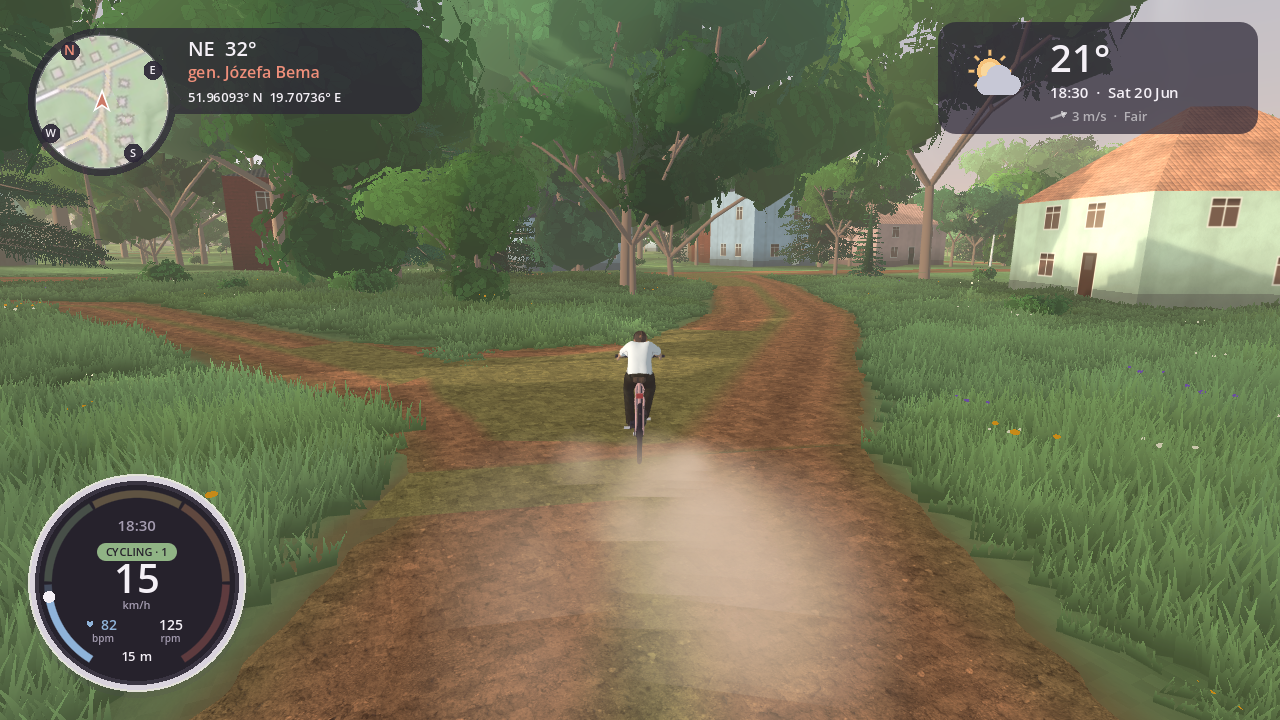
After the cars in the list (Change vehicle, or --vehicle=bicycle, --vehicle=dirt-bike):
| What it is | |
|---|---|
| Bicycle | A road bike. W pedals, S brakes, and eight gears you shift yourself with Shift/Ctrl: start in a low one, go up as you pick up speed. Your legs like 60 to 100 turns a minute; in too high a gear you can hardly push off, in too low a one you spin out. Up to about 30 km/h on asphalt, slower on grass and tracks. L switches its lights on and off. |
| Dirt bike | A 250 cc enduro on knobbly tyres: quick, light, at home on field tracks and in the forest. |
They lean into the turns and can't fall over, and when you stop you put a foot down and lean onto it. Both brake with ABS, so a hard stop doesn't lock a wheel or tip you over the bars, and the dirt bike won't lift its front wheel more than a little. Neither has a reverse: hold S at a standstill to walk it backwards with your feet. There's no parking brake either: get off with F and it waits on its stand. Hold Space for a wheelie; on the bicycle a tap of Space hops (over a kerb, a root, a ditch). They have their lights (the dirt bike its blinkers too).
On the bicycle your watch takes the dashboard's place, in its cycling mode: the speed, how fast you pedal, the gear, your heart rate and how far you've ridden.
On the water
Last in the list (Change vehicle, or --vehicle=kayak, --vehicle=rowing-boat, --vehicle=jet-ski) are three boats. Choose one at the water's edge (within 20 m) and it's put in the water there, deep enough to float it (the menu leaves them out when there's no water that near). Out on the water it lists the boats, swapped where you are, and near the shore (within about 20 m) the cars and bikes too, waiting for you on it. In the air it lists only the wings, and you fly on; choose a car or a bike again and it's waiting for you on the shore.
| What it is | |
|---|---|
| Kayak | A sea kayak. W paddles (a stroke at a time), S back-paddles, A/D turn it, on the spot too. About 8 km/h. |
| Rowing boat | A wooden boat with two oars: steadier and slower, about 6 km/h. You row as rowers do, facing the stern, looking over your shoulder where you're going. |
| Jet ski | A stand-up one: you ride it standing on its tray, bent over the bars. W opens the throttle, S goes astern; it steers with its jet, so it turns only while it thrusts. It lifts its nose and planes past 30 km/h, to about 60. |
They sit on the water, rock a little and go where they point (the hull doesn't slide sideways). Run one onto the shore and it's beached: back off into the water, or switch vehicles. The jet ski leans into its turns and squats back on its tail when you open the throttle.
In the kayak and the rowing boat your watch takes the dashboard's place: rowing it shows your split (minutes for 500 m, as rowers count), paddling your speed, and both the strokes a minute, your heart rate and how far you've come. You can take the phone out while you paddle.
Stop and press F out on the water to slip over the side for a swim; the boat waits for you, and F beside it gets you back in.
In the air
After the boats come the paramotor and the paraglider (--vehicle=paramotor, --vehicle=paraglider): a wing overhead on its lines, you in the harness, and on the paramotor a motor and propeller on your back.
To take off, run: hold W. Once the air over the wing is fast enough it lifts you; running into the wind helps, and on the paramotor its thrust does most of it, so any open field will do. The paraglider needs a slope or a good headwind, so take it up a hill.
In the air the wing flies at about 36 km/h. A/D bank it into a turn, S brakes it (slower, and it sinks least), and W is the paramotor's throttle (you climb) or the paraglider's speed bar (faster, but you sink more). Braking pitches the wing up and lifts you a little as it slows; the bar pitches it down and you dip as it speeds up. Without a motor you're always coming down a little, unless the wind blows up a slope under you: fly along a ridge into the wind and it holds you up. The real wind carries you, so mind which way it blows. Land gently. The flight instruments take the speedometer's place: the vario (climbing in green, sinking), your height over the ground, the airspeed (the red arc is too slow to fly) and the speed over the ground, its arrow showing where the wind is carrying you. Jumping somewhere on the map while you fly keeps you flying, as high over the ground there as you were. You can take the phone out in the air: the wing flies on by itself.
Carrying a bike
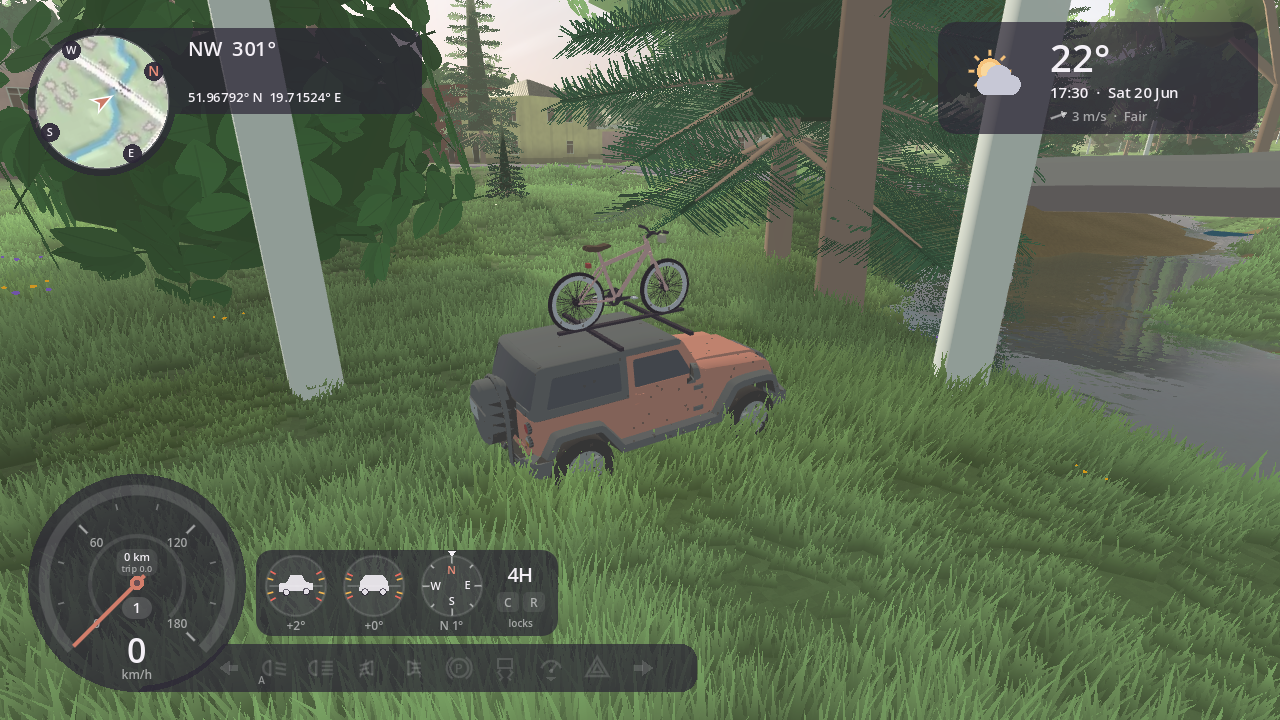
The cars carry a bike: the bicycle on a roof rack (the Explorer, the wagon, the minivan) or a tow-hook rack (the sedan, the city car, the EV), and the pickup takes either bike in its bed. Choose what to carry in the phone's Garage (its Carry tab: what doesn't fit is greyed out), drive out to the hills, get out, and at the rack (or the bed) F, or Y anywhere by the car, takes the bike down; F by the bike gets on. The car waits where you left it (an arrow on the minimap). Ride back, get off by the car, Y puts the bike back up, and F gets you in.
The jet ski goes on a trailer behind a car with a tow hook (Carry: Jet ski): it follows you round the bends, its lights working with the car's, and by a lake Y launches the jet ski into the water (and loads it back), the trailer staying hitched (or F beside the trailer, as the prompt says). At the trailer's coupling F unhitches it: it stands there while you drive off, and backing the car up to it again (the tow hook within 2 m), F there hitches it. The quick menu's Load & carry (Enter, right) has all of it: hitching the trailer, launching and loading the jet ski, unhitching. The kayak goes on a roof rack too (Carry: Kayak). By a lake, Y carries it down to the water and puts it in; walk or wade out to it and F gets you in. Back on the shore, get out by the car and Y puts it back on the roof.
The off-roaders have gear to load from the quick menu's Load & carry (stopped, or on foot by the car): the Explorer a rooftop tent and a jerrycan on its roof, the pickup a cool box, a water drum, jerrycans and a duffel bag in its bed and recovery boards on the cab. They start without it. A bike or the kayak takes the gear's place on its rack while it rides there. It gets as dusty as the car.
On foot
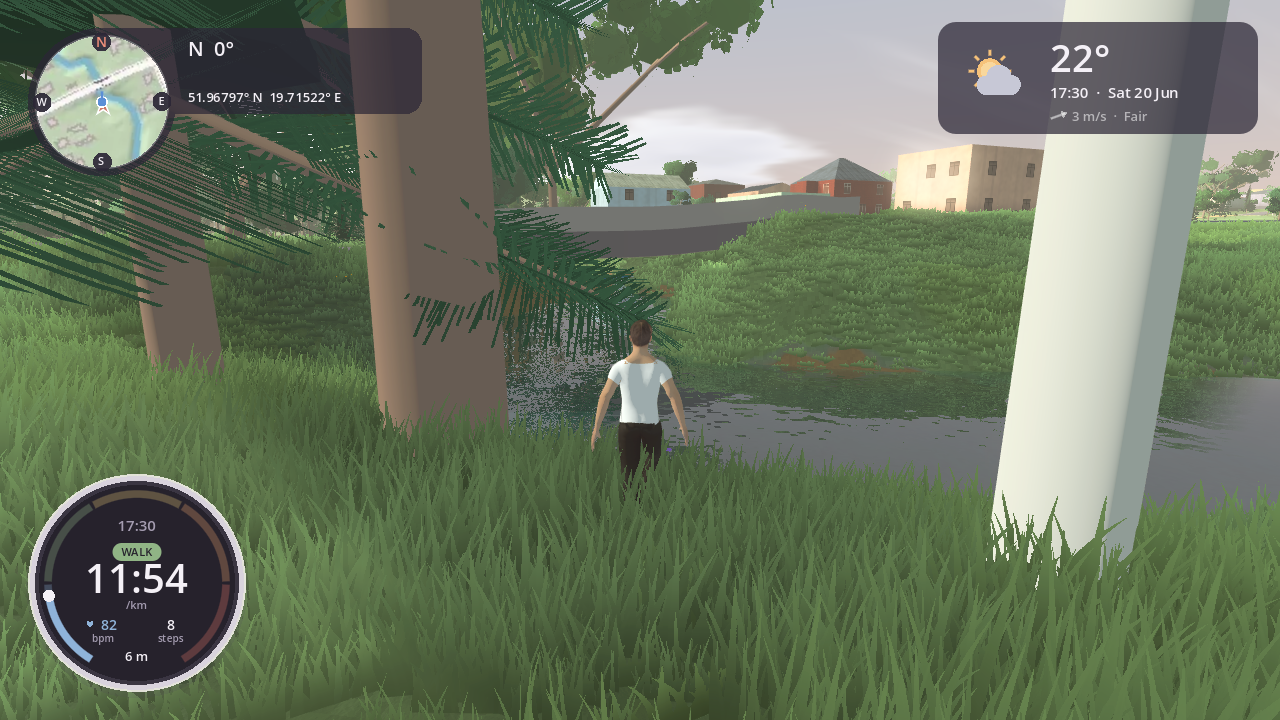
Stop, press F and you get out by the driver's door and walk. The car stays where you left it, parked with the parking brake on; the engine and the lights stay as you left them (I switches the engine off, L to parking lights before you go). Walk back to it and press F to get in; from anywhere else, F twice brings it to you: it's parked right beside you, facing your way. On the map you're a blue dot and the car its arrow, where you left it; going somewhere from the map on foot takes you there on foot, and the car waits (walk across the hills, then F twice when you're done and it comes to you).
The keys are in Controls.
You steer yourself as you steer the car, so looking around with the mouse never changes where you're going; the camera follows close, over your shoulder, and comes back behind you a moment after you let go. In place of the speedometer you wear a sports watch: your pace in minutes a kilometre, your heart rate on a ring of five zones (it climbs as you run and settles as you stroll), the steps and the distance since you got out, and the time. Your steps sound like the ground under them: a tap on asphalt, a swish in the grass, a crunch on gravel and snow. Stairs mapped in OpenStreetMap are stairs you climb, up to the footbridge over the tracks at Głowno's station, for one.
Walk into a lake and you wade, slower the deeper it gets, the steps splashing; once it's over your chest you swim, your head out, the pace keys (or T, the left stick's click) a gentle stroke or a hard one, and you walk out again where the bottom comes up. Lakes deepen gently from the shore. R while swimming takes you to the nearest shore.
Drive into water and it holds the car back hard; past what the car can wade (the Explorer about 80 cm) the engine takes in water and stalls. R brings the car out onto the nearest dry ground, where I starts it again. A bike in water too deep to ride puts you off it, into the water.
Bring a cat or a dog along: the quick menu's Companion (Enter, down-left), The cat or The dog. It follows you at your pace and trots to catch up, sits when you stop and lies down if you stay, sits with you when you sit, and rides in the car with you. It waits while you're on a bike and is there again when you get off. The game remembers it; Send the pet home there if you'd rather walk alone. Roaming with friends, they see it with you.
The backpack and the drone
On foot you can wear a backpack: put it on or take it off from the quick menu (Enter, Me, right). It stays on when you ride a bike, and your friends see it in a roam. In it is a small drone.
- Set it down: the quick menu's Me, left, or the phone's Hummingbird. It lifts to 1.5 m in front of you and hovers there.
- Hummingbird, the phone's drone app, shows what its camera sees, with its height (H), how far it is from you (D), its battery and the signal. Below them: Hover, Fly it in sight, Return home, Land (or Take off) and Pack it.
- Fly it in sight: the phone goes away and the controls fly the drone while you stand and watch it: W / S forward and back, Q / E sideways, A / D turn it, Shift / Ctrl up and down. F lets go: it holds where it is (Hover) and you can walk again. It goes on hovering while you walk or drive away.
- Fly it beyond sight: the same keys, but the camera goes with the drone: behind it, or through its own camera in first person (C). The minimap follows it, with you on it where you stand. In first person (or Hummingbird's Full screen view) the whole screen is the app: its height, distance, speed and heading along the bottom, its battery and signal along the top.
- Photos: Space while you fly it, or Take a photo in Hummingbird. They go into the phone's gallery and your Pictures like the Camera's, with the drone's place, height and direction. You stay with the drone, full screen too.
- Full screen: Esc (or C) leaves it, back behind the drone; Esc again pauses.
- From a parked car: stop and put the parking brake on (or turn the engine off), then in Hummingbird choose Launch it beyond sight. The drone takes off from the roof and you fly it beyond sight from the driver's seat; hovering and flying it in sight need you on foot beside it. F (or Land by the car) brings it back: it lands on the car and packs itself. While it flies, the screen shows the drone's card instead of the car's dials; they come back when it's home.
- On the screen: while the drone is out, a card beside the watch shows what it's doing, its height, how far away it is, its battery and the signal. The minimap shows it as a small X, and a friend's drone in a roam as a small X in their colour.
- Wind and battery: the wind pushes it, and a strong one carries it. The battery lasts about a quarter of an hour. When it runs low the drone comes back to you by itself, and it does the same if it flies out of range (about 800 m). When the battery is flat it lands where it is. It charges again in the backpack.
- Pack it: walk up to it and press F (it says Pack the drone), or use the quick menu's Me. From further away, the quick menu brings it home.
The phone and the camera
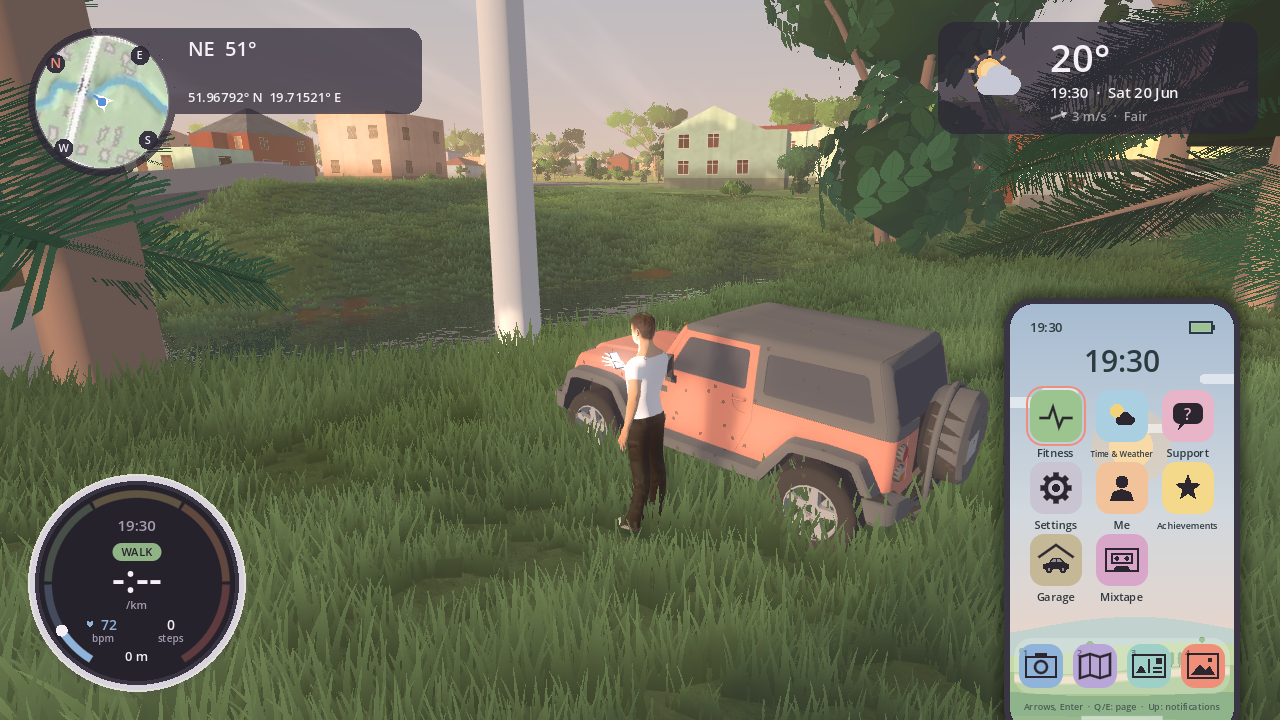
The game's messages come to your phone: the parking brake, the lights, a gear you can't take, where your car is. Its top rises from the bottom of the screen with the message, then slips away again; if the phone is already out, the message drops in at the top of its screen.
The first time you play, the phone welcomes you with how it works. Missed a notification? Pull them down: click the phone's status bar, or ↑ on its home screen (the ones since you started).
On foot, with the car stopped, under a wing or in a kayak or rowing boat, N takes out your phone: it comes up in the bottom right while the world goes on. In the first person in a car or on the dirt bike it's already out, on its mount by the cluster, and N opens it there (Camera). Esc or N puts it away. On foot you can walk with it out, slowly, head down over the screen (in the apps that don't use the arrows: Fitness, the Gallery).
Its home screen has pages of apps and a dock of four along the bottom:
| Open an app | a click; or the arrows to move the highlight, Enter to open |
| The dock's apps | 1-4 |
| Find one by name | type the start of it (SU for Support), then Enter |
| Turn the page | Q/E, or the arrows past the edge, or a click on the dots |
| Move an app | hold Enter on it, then the arrows (Q/E to another page, down into the dock), Enter to put it down, Esc to undo; or drag it with the mouse |
The phone keeps the apps where you put them.
- Camera: the screen becomes the camera's viewfinder, through your eyes (on foot) or from the driver's seat. Look around with the mouse or the arrows, zoom with the wheel or +/- (24 to 120 mm), G for a rule-of-thirds grid, and Space or a click to take the picture. The world doesn't stop: wait for the light. Pictures go to your Pictures folder (
Pictures/nowhereinparticular) as JPEGs; in the browser they download. The phone keeps a smaller copy of each (the newest 48). Each picture knows where it was taken, as a phone's does: the real latitude, longitude and height, the way the camera faced, the game's date and time, the focal length and the street and town are in its EXIF, so Photos, Google Photos or Lightroom put it on the map at the real spot in Głowno. - Gallery: the pictures you took, newest first, with where and when (the game's time) each was taken. Q/E or a click on either half browses, Delete removes one from the phone (not from your Pictures).
- Map: the map, as M opens it.
- Fitness: what your watch counted today (steps, distance and time on foot, and how far and long you cycled, swam, rowed or paddled), your last one of those (how far, how long, how fast: a swim per 100 m, a row per 500 m, as swimmers and rowers count) and the last days' steps.
- Postcards: roam the same place with friends. Start a roam and the phone gives you its code (C copies it) to tell your friends; or Join with a code and type or paste theirs. You arrive near whoever started it, everyone in their own car (or on foot) under the same sky: the host's time and weather are everyone's while you're together, and yours come back when you leave. Your friends see you as you are: your body, skin, hair and clothes in the colours you chose, your vehicle in its paint (repaint it and they see it at once), its lights, blinkers and hazards, what rides on its rack or its trailer and the gear on it, your second vehicle where you left it, your camp, and your cat or dog beside you or on the passenger seat. Everyone's name floats over them, never in your photos. Your name (Me) is all the others see. Everyone in the roam is on your minimap and the map (M), each in their own colour: an arrow along their way when they drive, a dot when they're on foot; further than the minimap shows, on its rim with their initial, pointing where they are; on the map with their name (and how far, when they're off its edge). Playing hide and seek? Hide my position in Postcards (off until you turn it on; the game remembers it) takes your mark and your name off your friends' maps: they still see you if they find you. An eye struck through on your minimap's rim says you're hidden. You need to be in the same place (the same region) as the host; roams need the network (Settings: Online).
- Your own server: roams run through our server, or through one you run yourself, with no account and no cloud (Host your own roam server). Choose it in Postcards (Server, then Your own server, then its address,
host:port). Its roams' codes come with the address (K7QM4X@192.168.0.22:47200, C copies both), and friends paste all of it into Join with a code. A server that's full says so ("The server is full right now: try again in a few minutes"); nobody already in a roam is dropped. Invites go through our server, so on yours you tell friends the code yourself. - Friends and messages are off until you turn them on (Postcards: Friends and messages: turn on). Then the game's service keeps your name, a friend code it makes for you, who your friends are, and messages until they're delivered (30 days at most): nothing else, and turning it off deletes it all. Give your code to a friend (C copies it; in a roam C copies the roam's code and F yours) or add theirs (Friends, + Add a friend); they say yes or no. Open a friend to write to them, invite them into your roam ("Wish you were here": they get it on their phone and join with Enter), remove or block them. New messages, requests and invites show on the phone and as a number on the Postcards icon.
- Your own server: roams run through our server, or through one you run yourself, with no account and no cloud (Host your own roam server). Choose it in Postcards (Server, then Your own server, then its address,
- The flashlight: on top of the notifications (pull them down: ↑ at home, or click the status bar; Enter or a click toggles it), as L on foot.
- Sound, vibrate or silent: under the flashlight in the pull-down (←/→ or a click), and in Settings › Sound. News (a message, an invite, a support answer, an achievement) comes with a soft chime, a buzz, or nothing; the phone's other little notes never make a sound.
- Mixtape: our own station, Nowhere FM, and live internet radio. Nowhere FM is first in every list, in its own colour: calm music made for the game (smooth jazz, rock ballads, slow post-rock, lo-fi for the night), shuffled, one song flowing into the next, mellower at night and jazzier in the afternoon. It comes with the game, so it plays anywhere, offline too, and it's in your favourites from the start (F takes it out, and it stays out). Then the live stations: the ones near you first (the country you're in), your favourites, calm ones from anywhere, and all of them. ↑/↓ pick one, Enter plays it (on the one playing: stops it), F keeps it as a favourite, Q/E change the list; a click plays, a click on what's playing stops it. Without the phone, as on a steering wheel: O pauses and plays (the last station, or the first of the list), 9 and 0 go to the station before and after in the list you last played from (your favourites, or the ones near you), and the keyboard's media keys do the same where your computer passes them on (not while a menu, the map or the settings are open). A note on screen says which station, and a card at the top names each new song. Nowhere FM waits where you paused it; a live station can't wait: it plays on from now. The top shows the station and the song when the station says it. In a car the music comes through its speakers (muffled when you watch from outside); on foot, on a bike, in a boat or under a wing, from the phone's small speaker. It's each station's own live stream, played as any radio app does: nothing is stored, and it plays only once you start it. Music in your recordings or streams of the game can be muted or claimed by the music's owners. In the browser and the downloads only Nowhere FM plays for now (the live stations come with gasm's player later; there, some will play at a set level, without the car's muffling or the song's name), and with Online off it's Nowhere FM alone.
- Hummingbird: the drone's app (see The backpack and the drone).
- Garage: your vehicles. On top the one you're in (on foot: where it's parked), what it carries and your trip. Vehicles lists them all, cars, two wheels, boats and wings, with what each is; Enter changes to it, there where you are (on foot too: it comes to you). One you can't have here is greyed and says why (a boat needs water near, in the air only a wing). Carry puts a bike or a boat on the car you're in (the roof rack, the tow-hook rack, the pickup's bed, the jet ski's trailer); what doesn't fit is greyed out. Colour paints it: its own colour first, then fifteen to choose from; the arrows choose and Enter paints it there and then (the dust, the mud and the wear stay on it). Each vehicle keeps its colour, and your friends see it in a roam. Seat (in a car, sitting in it) moves you behind the wheel: higher or lower, closer to the wheel or further back, and how wide you see from the driver's seat (50° to 80°; the car's own is 62°). ← → (or a click on − and +) change it a step at a time, and in first person the view looks up from the phone a moment to show you; As the car has it puts it back. Each car keeps its own; where the roof, the wheel or the dash stop you, the page says so. Trip has the trip meter and the odometer, and resets the trip. ↑ ↓ choose, Q / E change the tab, or click; with a gamepad the D-pad, A and the shoulders (open it from the Paused panel's Garage…).
- Time & Weather: what the weather is where you are (the temperature and conditions, the wind, the clouds and rain or snow, the roads, the sun), and the clock and the weather to set: the time of day, the day (and so the season), how fast the clock runs (paused, real time, 1 min/s, 10 min/s), the weather (any of the presets: it comes in over about 25 seconds, as the real one does), and Sync with the real world (as K). ↑ ↓ choose, ← → change (with Shift: an hour, a week), or click a row's left or right side.
- Achievements: small milestones of your own, as badges. Each has a name and an icon but doesn't say what it's for: do the thing and it lights up in colour, the phone tells you, and then it says what it was. Eleven of them.
- Me: who you are to the game, without an account: your name (yours to choose, kept only on your computer), your body (a man or a woman: Enter on Body switches, and you're dressed at once, on foot and on the bikes, and your friends see you so in a roam), how you look (Skin, hair, clothes: your skin's tone, from porcelain to deep, your hair's colour, from platinum through red and brown to black, greys and a few dyed ones, and the top, the trousers and the shoes, each its own; ↑ ↓ choose which, ← → its colour, at once; As made is the body's, the hair's or the garment's own; kept for each body, and seen by your friends), your id and a secret. Copy them (Enter on the id, C on the secret, or both at once) and, on another computer, Move here and paste them: your reports and their answers come with you. The secret is made the first time you use Support; until then your id is all there is.
- Settings: the Paused panel; when you close it, the phone comes back.
- Support: something wrong (a road where there's none, a car that won't drive, a bridge in the air)? Pick + New report: the phone takes a screenshot of what's on the screen, and you write a few words (Enter sends, Shift+Enter starts a new line, Esc cancels; you stand still while the app is open). Your reports are listed with their status; when support answers, or a report is resolved, the phone tells you. Open one to read the answers and reply (R), or G to go back to where you reported it, to see if it's fixed.
What a report sends (and a reply: a reply takes its own screenshot and says where you are, so "the same happens here" is enough), and nothing else: your note, the screenshot, where you were (the place in the game and its real coordinates, the street, the way you faced), and the game's state then (its version, the platform and screen, the frame rate, on foot or which vehicle, its speed, gear and the ground under it, the game's time and weather, the gearbox setting, your mods). You stay anonymous (see Your privacy). Reports go to the game's support desk (api.nowhereinparticular.emdzej.pl), where only the people answering them see them.
Use my phone: the companion app
Coming soon to the App Store and Google Play
Nowhere, the game's companion app for iPhone (Android next), is on its way to the App Store and Google Play. It needs no account, and it talks to your game over your own Wi-Fi only: nothing goes through the internet or our servers.
In the downloaded game (not in the browser, which can't listen for a phone), the game's phone can be your real one: the companion app Nowhere, on the same Wi-Fi as your computer. Use my phone is on in Settings › General (turn it off and nothing listens). On the phone, Connect lists the games it finds on your Wi-Fi (it looks on your local network only, and finding a game trusts it with nothing): tap yours, or type its address. The first time, the game asks: "An iPhone wants to connect to the game", Enter (A) to allow, Esc (B) to deny, or the same buttons in Settings › General. Allowed once, they know each other: opening the app links it again by itself, even if the computer's address changed. While it's linked, Garage, Hummingbird (with the drone's camera, live), Time & Weather, Mixtape, Settings, Fitness, Me, Postcards, Gallery, Camera, Map, Achievements and Support are on your phone, working as in the game, by touch: tap a row (on its left or right side to step a value down or up), drag a list; and the game's notifications come to it. Mixtape there is a remote: the music still plays on your computer. Settings there has the picture's quality and its parts, the sound's levels, the phone's news and Online; the resolution, the window, the keys and the mods stay in the game's Settings. Me there has your name, your body and your looks; your secret, moving to another computer and your data on the server stay in the game's Me. Names, codes and messages are typed on the phone's own keyboard. The game's notifications: tap the bell at the top right (it counts the new ones), or tap or swipe down on the home screen's big clock; Done puts the list away. The first time it links, the app asks to show notifications: allowed, the game's notifications come to your phone as its own when you've switched to another app, for the half a minute or so iOS lets an app run in the background (it links again by itself when you come back). Fly the drone from your phone: tap Hummingbird's picture and it fills the screen, sideways: the drone's camera live with two thumb sticks over it (left: up, down and turn; right: forward, back and sideways), Photo (into the game's gallery), Beyond, Full screen, Home, Let go and Tilt (steer by tilting the phone instead of the right stick). Drag up or down in the middle of the screen to tilt the camera (straight down for a map-like photo), and double-tap there to level it again. ✕ closes it. Gallery shows your game's pictures, newest first: tap one to see it big with where and when it was taken, swipe left or right for the next, Share… for your phone's own share sheet (AirDrop, Messages, Save Image into your photos: the picture keeps its place, time and lens), and Delete (tap it twice) to delete it in the game. Camera opens the game's camera from your phone, sideways: its view live, drag to look around, − and + to zoom, the round button takes the picture (into the game's gallery and your Pictures folder, as the game's own Camera does), ✕ puts it away. Map is the game's map: drag to move it, − and + to zoom, Follow me to have it follow you again. Achievements shows your badges (drag to scroll; tap one for what it was for, once you've earned it). Support lists your reports and their answers: + New report takes the game's screen as it is and you type what's wrong on your phone; the game sends it, with where you are, as it would from its own phone. Open a report to read it, Reply, or Go there to go back to where you made it. With the phone linked, N in the game says which apps are on your phone; its Camera still works there. They're all back in the game as soon as you Unlink (on the phone's Connect page), close the app or leave the Wi-Fi. Unpair a phone in the game's Settings › General, or Forget the game on the phone's Connect page, and the next time it asks again.
Time, seasons and weather
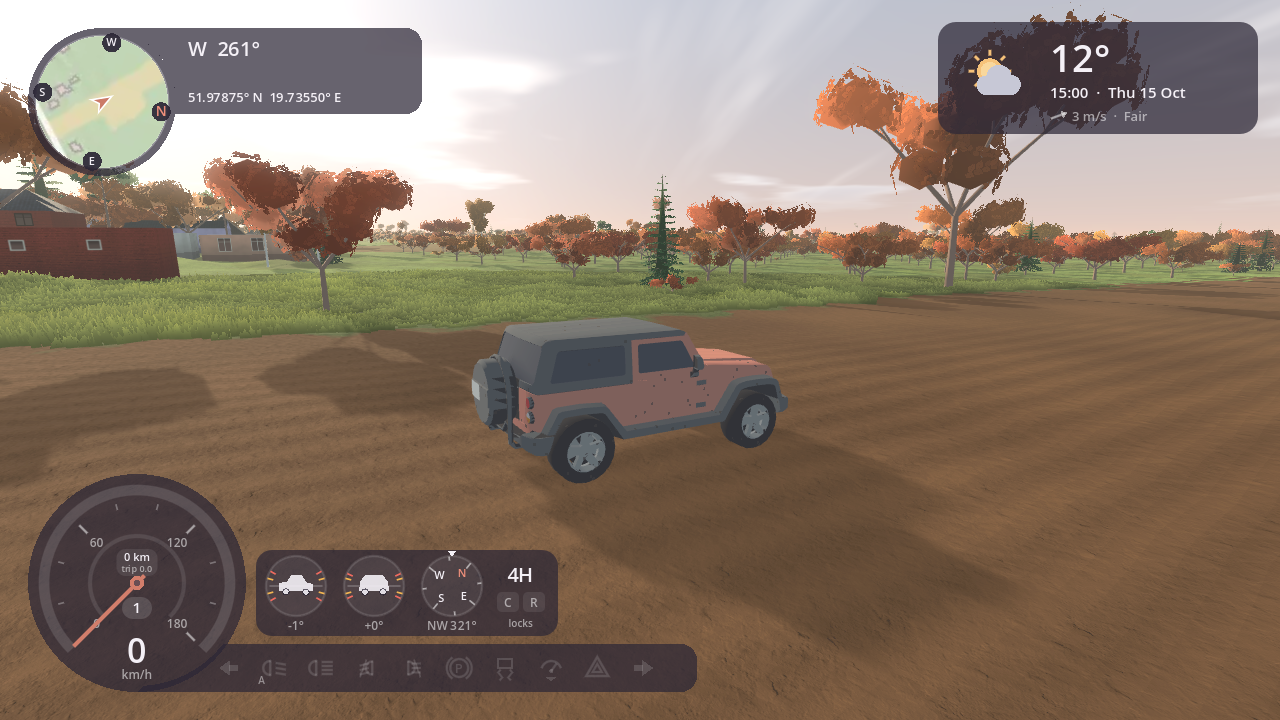
The sky is real. The sun and the moon are where they are over Głowno (51.96° N, 19.72° E) at the game's date and time, on Polish time (CET, CEST in summer). The moon lights the night by its phase. The game starts at the real date and time, running in real time; the phone's Time & Weather speeds it up or stops it.
The phone's Time & Weather sets the time of day and the day of the year, the clock speed (paused, real time, 1 min/s, 10 min/s) and the weather. [ and ] move the clock an hour back or forward.
Seasons follow the day of the year: fresh green in spring, dry and straw-coloured in late summer, autumn colours from September peaking in October, the leaves falling tree by tree from mid October, bare deciduous trees from late November until the leaves come back in April and early May, a dormant tint in winter. The fallen leaves lie under the trees that shed them, yellow, orange and red at first, then brown, through the winter until they've rotted away in April. When the weather isn't real, the temperature is typical for the season and the hour (Łódź's monthly normals).
Weather presets: clear, fair, cloudy, overcast, fog, rain, storm (with lightning) and snow. The sky has three layers of cloud, as forecasts give them: low (puffy cumulus lit from the sun's side, or a grey lid), middle and high (thin cirrus streaks along the wind), drifting with the wind, and the low clouds' shadows slide across the land. The light follows the sky too: a warm sun and blue shade on a clear day, orange at sunset, flat and grey under cloud, dull in the rain, bright over snow. The distance fades into haze that follows the air: crisp and clear after rain or in a wind, softer on a humid, still day, warm towards a low sun. Weather changes over about 25 seconds, and leaves something on the ground:
- Rain wets the roads (soaked in about ten minutes of game time; they dry in sun and wind), and water stands in puddles on them. Wet asphalt loses about a quarter of its grip, and dirt, grass and forest turn towards mud.
- Snow settles when it's cold and covers everything but the asphalt roads, which are ploughed and salted: while it snows they keep a thin layer, worn through in the wheel tracks, and within the hour after, they're clear and wet, with brown slush at the edges and a grey bank of ploughed snow beside them. In a hard frost (below about −6 °C) the salt stops working and packed snow stays on them. On snow, grip drops to snow's (a little better on paved ground); on a cleared road it's a wet road's. Snow melts above freezing and wets the roads as it goes.
- Black ice: wet roads below freezing are very slippery.
Wind turbines, where they stand, follow the wind: the whole farm turns slowly to face it, and the blades turn with its strength, idling in a calm, at full speed in a good breeze, stopped in a gale. By night the red lights on their roofs flash together. They're on the map too.
Tall buildings, chimneys and masts carry red aviation lights from dusk: steady ones on their tops, and on the very tallest flashing ones (in step with the wind turbines') with more steady ones part way down.
Trains and trams go about the real lines: a passenger train now and then on the railway, trams in the city's streets, slowing for the curves and stopping at their stations and stops for a while before going on. They come and go out of sight. Keep off the track: a train doesn't stop for a car on it.
Sync with the real world (K, or the button in the panel) sets the clock to now, running in real time, and the weather to MET Norway's forecast for Głowno at this hour: clouds, fog, wind, rain, snow, sleet, thunder and the real temperature, with the low, middle and high cloud as forecast. The game fetches it itself; the panel shows what it synced from. Once synced, the weather is fetched again every 5 minutes, so it changes as the real one does (switch that off on the phone, Time & Weather: Real weather); a weather you choose yourself stays as you chose it.
Lights
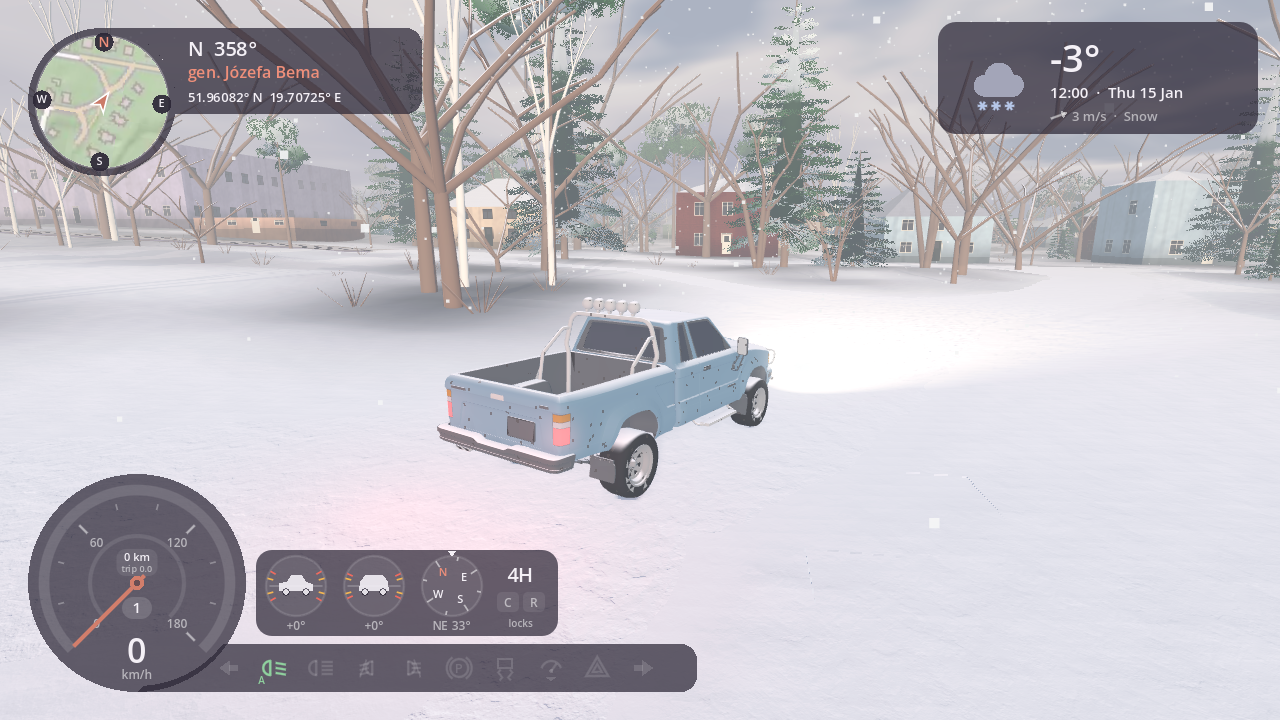
The car's headlights and tail lights are automatic: on at dusk and at night, and in fog, rain or snow. L cycles automatic, always on, parking lights (the small front lamps and the tail lights, for a parked car) and off; brake and reversing lights work as you'd expect. The lights stay as you left them when you get out, so a parked car can keep its parking lights on, or its headlights lighting the way. I switches the engine off (each car idles at its own speed, around 700 rpm, when it runs); with it off, automatic lights go out, and a running engine fades as you walk away. Tall street lamps, their curved arms over the road, stand along the lit roads (on the proving ground, the asphalt ones; in real places, the roads OpenStreetMap marks as lit) and switch on one by one at sunset and off at sunrise, the real times for the place and the day. Junctions with traffic lights have them at each stop line, facing you: green, amber, red, then red and amber before green, the cross road in turn; late at night (from 23:00 to 5:00) they flash amber.
The ground
Where roads meet, the junction is one surface, with no seams across its asphalt; where paths meet, the same. Głowno's petrol stations have their canopies and pumps. Buildings are made of what they'd be made of there: plastered houses under clay or metal tiles, brick and block outbuildings, wooden sheds and barns under corrugated sheets, metal halls. Their windows and doors follow what they are (shop windows on the main street, garage doors, a barn's small high windows), and at night some of the windows are lit.
Forests are spruces, pines, birches and broadleaves with real branches, young trees among the old, bare in winter, with bushes along their edges, in gardens and in parks.
Houses and trees shade the ground softly around them. Grass grows around you, a blanket the colour of the meadow it grows in, right up to the paths, with flowers among it, glowing at the tips against a low sun, swaying in the wind, drying to straw in late summer and autumn and sinking under snow. The fields follow the farming year: green shoots in spring, rapeseed yellow in May, wheat gold in July, then stubble, ploughed earth and the new sowing, and tall maize until October. Sand has ripples, gravel stones and the forest floor fallen leaves. Lakes and rivers mirror the shore and the sky, calm as glass on a still day and rougher in the wind (rivers more so); near the shore you see the bottom through them. Boats, wading and swimming leave rings and a wake behind you, rain makes rings on them, and they freeze in a hard frost. On dry tracks the car raises dust in the colour of the ground, and throws up spray on wet roads, through puddles and in snow. Soft ground keeps your tracks: ruts behind the wheels and footprints behind you in snow, mud, sand, fields and the dirt roads, the grass laid flat where you drove. The grass stands up again in a few minutes, mud and sand keep them until the rain smooths them, and new snow fills them in. Brake hard enough to lock the wheels, spin them or slide the car sideways on a paved road and the tyres leave black rubber marks; they fade over several minutes, quicker in the rain. And it keeps what it picks up: dust from dry tracks settles on it, mud climbs up its sides after wet fields and muddy lanes, dark while fresh and paler as it dries; rain washes it off slowly, a ford quickly, and kilometres off road leave the paint a little worn. Bikes get muddy too.
The map
M opens the map: the world from above, north up, as a flat pastel map with the hills shaded, the buildings, the roads and bridges drawn on top and the car as an arrow. It shows the date, the time and the weather, a north arrow, a scale bar and the car's real coordinates. Drag to pan, scroll to zoom, F to follow the car again. Double-click a spot (or point at it and press G) to put the car on the nearest road there, facing along it: the quick way to explore somewhere else, or to get out when stuck.
Sound
The engine, the tyres, the wind and the rain are our own sounds, following the physics as you drive: a four-cylinder whose firing follows the revs and brightens with load, squealing tyres when they slide on paved roads, wind rising with speed and the weather's wind, and rain on the roof. The tyres sound like what they roll on: the road's roar and the thump of concrete slabs, a hiss and splashes on wet roads, gravel crunching, grass swishing, sand hissing, mud squelching, snow crunching (and squeaking in a hard frost), water sloshing. Around you: thunder after the lightning, later the farther it struck; rain pattering on the leaves in a wood; water lapping by a lake; geese going over in autumn and early spring; a dawn chorus in spring; and falling snow hushes it all. On top of that there are recorded sounds, all CC0: birds by day (fewer in winter, none in rain or strong wind), crickets on warm nights, your footsteps on foot (ours too), and knocks when you hit something (Kenney's Impact Sounds).
Command-line options
The game takes options after --. On gasm they go in the args launch parameter:
sh
gasm-run godot.wasm --asset game.pck=nowhereinparticular.pck --asset-dir tiles=tiles --param "args=-- --time=2026-01-15T08:00 --weather=snow"
make run ARGS='--param "args=-- --vehicle=2 --top"'
./play.sh --param "args=-- --sync"
In the browser, put them in ?args= without the --: /play/?args=--vehicle=2 --top.
The world's map data isn't in the game's pack: it's the tiles folder beside it (the bundles' launchers hand it to gasm as --asset-dir tiles=tiles; the Steam builds find it beside the game).
| Option | What it does |
|---|---|
--time=YYYY-MM-DDTHH:MM | Start at this local date and time (Głowno's). |
--mixtape=NAME | Mixtape plays this station from the start (its name as the app lists it; --mixtape=nowhere-fm for ours). |
--speed=N | Clock speed: 0 paused, 1 real time (the default), 60, 600. |
--weather=NAME | Start with a weather preset: clear, fair, cloudy, overcast, fog, rain, storm, snow. |
--snow-cover=C | Snow lying on the ground (0 to 1), as if it had fallen a while ago: a clear day after snow, the roads ploughed. Give it after --weather. |
--sync | Start synced to the real world (the clock, and the weather if there is a weather.json). |
--vehicle=N | Start in vehicle N (--car=N still works): 0 Explorer, 1 Sedan, 2 Wagon, 3 City car, 4 Minivan, 5 Pickup, 6 EV, 7 Bicycle, 8 Dirt bike, 9 Kayak, 10 Rowing boat, 11 Jet ski, 12 Paramotor, 13 Paraglider (or its name: --vehicle=pickup, --vehicle=ev, --vehicle=dirt-bike, --vehicle=jet-ski). |
--lights=on|off | Car lights always on or off (default: automatic). |
--top | Start in the top-down view. |
--first | Start in the first person. |
--look=YAW[,PITCH] | In the first person, start with your head turned (degrees: left and up are positive). |
--seat=H,F[,FOV] | Your seat in every car this run (Garage keeps yours per car): H cm up, F cm closer to the wheel (negative: down, back), FOV degrees (left out: the car's own), as far as each car allows. |
--no-cockpit | The first person in a car or on a motorcycle as it was: the instruments on the screen, no screens on the dash (to compare). |
--map | Start with the map open. |
--spawn=X,Z,YAW | Start there: metres, as the minimap shows them, yaw in degrees (0 = north, 90 = west). |
--gearbox=easy|automatic|manual | The gearbox for this drive (else the settings'). |
--settings[=TAB] | Start with the Paused panel open (on that tab: Screen, Picture, Sound, Keys, Mods). |
--no-grass | No grass (to compare the frame rate). |
--no-reflections | No mirror in the water (to compare the frame rate; the setting's Off). |
--carry=KEY | Start with a bike on the car's rack or in its bed (bicycle, dirt-bike), or the kayak on the roof. |
--auto-blinkers | The blinkers on by themselves when you turn off slowly (as Garage › Driving's Indicators: Automatic). |
--config=DIR | Your own values for how bright the lamps are and how far and how hazy things are drawn: a drawing.json in DIR with the settings to change, for example {"lamps": {"head_low_energy": 2.0}} (the game's own file, with a note on each, is config/drawing.json in the game's pack). A setting the game doesn't know is ignored with a warning. Not in the browser. |
--quality=Q | A quality preset for this run: low, medium, high or ultra. |
--bench=S | A measured run of S seconds in a window: the throttle held from 3 s in (--bench-still: standing), then the frame rate, the 1 % low, the worst frame and the slow frames' share, and quit. |
--orbit=DEG[,PITCH[,ZOOM]] | Turn the chase camera around the car, and up or down, and zoom (steps, negative closer; screenshots). |
--orbit-hold | Keep the chase camera where --orbit turned it, even on the move (screenshots). |
--dirt=D[,M] | Start with the vehicle dusty (D) and muddy (M), 0 to 1 (screenshots). |
--clean | No help text (screenshots). |
--no-splash | No title screen at the start, and no globe (--clean has neither). |
--menu, --no-menu | Open on the globe, or not (it comes by itself unless an option already says where to start). |
--walk | Start on foot, next to the car. |
--walk-at=X,Z[,YAW] | Start on foot standing there (metres as the HUD shows them, the heading in degrees as --spawn). |
--backpack, --no-backpack | The backpack on or off for this run (otherwise as you left it). |
--drone, --drone-sight, --drone-beyond, --drone-fpv | With --walk: the drone set down at the start, hovering; or flown in sight, beyond sight, or beyond sight full screen, at once. |
--pet=cat|dog|none | Your pet along for this run (otherwise the one you chose in the quick menu's Companion). |
--debug | Show the debug info (the map tile and position), as the setting does. |
--outfit=KEY | How you look on foot: an outfit by name (the game's default, or a mod's). |
--outfit-colour=PART:#rrggbb | A colour for your skin, hair or clothes this run (skin, hair, top, trousers, shoes; Me keeps yours). |
--paint=KEY:#rrggbb | A vehicle's paint this run, e.g. --paint=explorer:#8fa88a (Garage keeps yours). |
--telemetry | Print the car's state every second: position, speed, gear, revs, surface, grip, time, sun and weather (tests and tuning). |
--offline | No network for this run: no real weather, Support or Postcards (Settings: Online stays as it is). |
--roam-server=ADDR | Roams on your own server this run (host:port or a URL, as Postcards' Server: Host your own roam server). |
--tiles-dir=DIR | Where the world's map data is (its tiles folder), if not beside the game. |
Where you are
You're in Głowno in central Poland: the town, the Mrożyca valley with its reservoirs, the forests, fields, orchards and farm tracks around it, 6×6 km, built from open data. At its edge a gentle wall stops the car ("The map ends here, for now"). The proving ground (--proving-ground) is a test world, not a real place. The map data and its licences are described in Data sources & attribution.